Unlocking the Codex harness: how we built the App Server
TL;DR
The Codex App Server is a bidirectional JSON-RPC API that enables different Codex surfaces (web app, CLI, IDE extensions) to share the same underlying agent harness. It provides conversation primitives like threads, turns, and items to handle complex agent interactions beyond simple request/response patterns.
Key Takeaways
- •The Codex App Server evolved from a practical solution to reuse the Codex harness across products into a standardized JSON-RPC protocol for embedding Codex capabilities.
- •It exposes the Codex harness through conversation primitives: threads (durable sessions), turns (units of agent work), and items (atomic input/output units with lifecycles).
- •The architecture includes components like thread managers and message processors that translate between client requests and Codex core operations, enabling rich UI experiences.
- •The protocol supports bidirectional communication, allowing the server to initiate requests (e.g., for approvals) and stream detailed events for real-time updates.
- •It facilitates integration across diverse clients (e.g., VS Code, JetBrains, desktop apps) by providing a stable, backward-compatible API for agent workflows.
Tags
OpenAI’s coding agent Codex exists across many different surfaces: the web app(opens in a new window), the CLI(opens in a new window), the IDE extension(opens in a new window), and the new Codex macOS app. Under the hood, they’re all powered by the same Codex harness—the agent loop and logic that underlies all Codex experiences. The critical link between them? The Codex App Server(opens in a new window), a client-friendly, bidirectional JSON-RPC1 API.
In this post, we’ll introduce the Codex App Server; we’ll share our learnings so far on the best ways to bring Codex’s capabilities into your product to help your users supercharge their workflows. We’ll cover the App Server’s architecture and protocol and how it integrates with different Codex surfaces, as well as tips on leveraging Codex, whether you want to turn Codex into a code reviewer, an SRE agent, or a coding assistant.
Origin of the App Server
Before diving into architecture, it’s helpful to know the App Server’s backstory. Initially, the App Server was a practical way to reuse the Codex harness across products that gradually evolved into our standard protocol.
Codex CLI started as a TUI (terminal user interface), meaning Codex is accessed through the terminal. When we built the VS Code extension (a more IDE-friendly way to interact with Codex agents), we needed a way to use the same harness so as to drive the same agent loop from an IDE UI without re-implementing it. That meant supporting rich interaction patterns beyond request/response, such as exploring the workspace, streaming progress as the agent reasons, and emitting diffs. We first experimented with exposing Codex as an MCP server(opens in a new window), but maintaining MCP semantics in a way that made sense for VS Code proved difficult. Instead, we introduced a JSON-RPC protocol that mirrored the TUI loop, which became the unofficial first version(opens in a new window) of the App Server. At the time, we didn’t expect other clients to depend on the App Server, so it wasn’t designed as a stable API.
As Codex adoption grew over the next few months, internal teams and external partners wanted the ability to embed the same harness in their own products in order to accelerate their users’ software development workflows. For example, JetBrains and Xcode wanted an IDE-grade agent experience, while the Codex desktop app needed to orchestrate many Codex agents in parallel. Those demands pushed us to design a platform surface that both our products and partner integrations could safely depend on over time. It needed to be easy to integrate and backward compatible, meaning we could evolve the protocol without breaking existing clients.
Next, we’ll walk through how we designed the architecture and protocol so different clients can use the same harness.
Inside the Codex harness
First, let’s zoom in on what’s inside the Codex harness and how the Codex App Server exposes it to clients. In our last Codex blog, we broke down the core agent loop that orchestrates the interaction between the user, the model, and the tools. This is the core logic of the Codex harness, but there’s more to the full agent experience:
1. Thread lifecycle and persistence. A thread is a Codex conversation between a user and an agent. Codex creates, resumes, forks, and archives threads, and persists the event history so clients can reconnect and render a consistent timeline.
2. Config and auth. Codex loads configuration, manages defaults, and runs authentication flows like “Sign in with ChatGPT,” including credential state.
3. Tool execution and extensions. Codex executes shell/file tools in a sandbox and wires up integrations like MCP servers and skills so they can participate in the agent loop under a consistent policy model.
All the agent logic we mentioned here, including the core agent loop, lives in a part of the Codex CLI codebase called “Codex core(opens in a new window).” Codex core is both a library where all the agent code lives and a runtime that can be spun up to run the agent loop and manage the persistence of one Codex thread (conversation).
To be useful, the Codex harness needs to be accessible to clients. That’s where the App Server comes in.
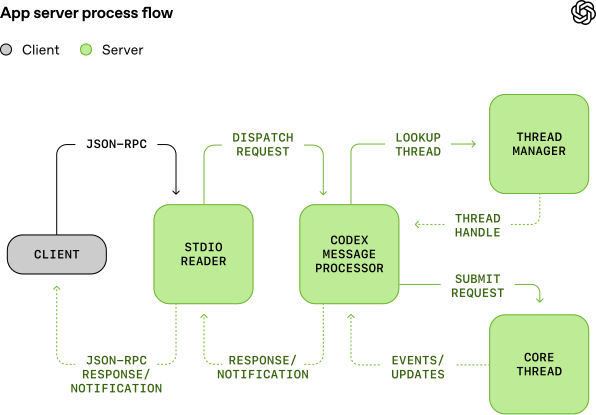
The App Server is both the JSON-RPC protocol between the client and the server and a long-lived process that hosts the Codex core threads. As we can see from the diagram above, an App Server process has four main components: the stdio reader, the Codex message processor, the thread manager, and core threads. The thread manager spins up one core session for each thread, and the Codex message processor then communicates with each core session directly to submit client requests and receive updates.
One client request can result in many event updates, and these detailed events are what allow us to build a rich UI on top of the App Server. Furthermore, the stdio reader and the Codex message processor serve as the translation layer between the client and Codex core threads. They translate client JSON-RPC requests into Codex core operations, listen to Codex core’s internal event stream, and then transform those low-level events into a small set of stable, UI-ready JSON-RPC notifications.
The JSON-RPC protocol between the client and the App Server is fully bidirectional. A typical thread has a client request and many server notifications. In addition, the server can initiate requests when the agent needs input, like an approval, and then pause the turn until the client responds.
The conversation primitives
Next, we’ll break down the conversation primitives, the building blocks of the App Server protocol. Designing an API for an agent loop is tricky because the user/agent interaction is not a simple request/response. One user request can unfold into a structured sequence of actions that the client needs to represent faithfully: the user’s input, the agent’s incremental progress, artifacts produced along the way (e.g., diffs). To make that interaction stream easy to integrate and resilient across UIs, we landed on three core primitives with clear boundaries and lifecycles:
1. Item: An item is the atomic unit of input/output in Codex. Items are typed (e.g., user message, agent message, tool execution, approval request, diff) and each has an explicit lifecycle:
item/startedwhen the item begins- optional
item/*/deltaevents as content streams in (for streaming item types) item/completedwhen the item finalizes with its terminal payload
This lifecycle lets clients start rendering immediately on started, stream incremental updates on delta, and finalize on completed.
2. Turn: A turn is one unit of agent work initiated by user input. It begins when the client submits an input (for example, “run tests and summarize failures”) and ends when the agent finishes producing outputs for that input. A turn contains a sequence of items that represent the intermediate steps and outputs produced along the way.
3. Thread: A thread is the durable container for an ongoing Codex session between a user and an agent. It contains multiple turns. Threads can be created, resumed, forked, and archived. Thread history is persisted so clients can reconnect and render a consistent timeline.
Now, we’ll look at a simplified conversation between a client and an agent, where the conversation is represented by primitives:
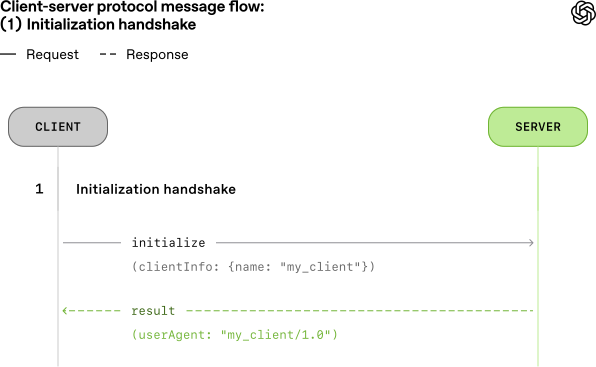
At the beginning of the conversation, the client and the server need to establish the initialize handshake. The client must send a single initialize request before any other method, and the server acknowledges with a response. This gives the server a chance to advertise capabilities and lets both sides agree on protocol versioning, feature flags, and defaults before the real work begins. Here’s an example payload from OpenAI’s VS Code extension:
JSON
1{2 "method": "initialize",3 "id": 0,4 "params": {5 "clientInfo": {6 "name": "codex_vscode",7 "title": "Codex VS Code Extension",8 "version": "0.1.0"9 }10 }11}
This is what the server returns:
JSON
1{2 "id": 0,3 "result": {4 "userAgent": "codex_vscode/0.94.0-alpha.7 (Mac OS 26.2.0; arm64) vscode/2.4.22 (codex_vscode; 0.1.0)"5 }6}